
Employer branding guidelines
This is an overview for graphic designers working on Employment Marketing projects. Links to specific details are available to them where indicated.
Visual design
The Employment Brand layout - which must always include the Airbus logo - consists of two parts: the headline and tagline.
- Headline
It always comes first in the layout.
It always includes the "Blank Space" concept (see below).
- Tagline
It sits just below the headline.
Only the first word in the headline and tagline should be capitalised, unless a proper noun is used - please refer to the Airbus writing conventions.
Layout sample of headline and tagline
Design element Blank Space
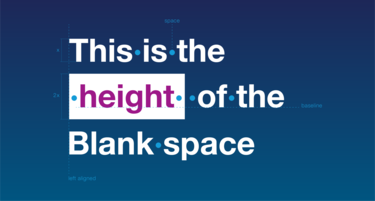
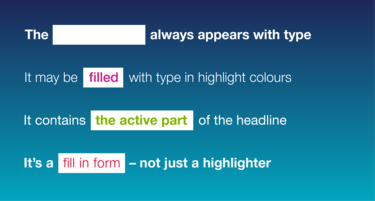
The "Blank Space" is a white box in the headline, highlighting an action (find, join, make...).
Only one Blank Space should be used per static asset, whereas in video or dynamic assets, only one Blank Space should be used per shot.
Blank Space dimensions and text alignment:
The Blank Space is always part of a headline – it should never appear in a tagline or body text.
The surrounding type and the type within the Blank Space can be of different weights, but must use the same font size.
The Blank Space's height is defined at double cap height. There must be one space between the text before the Blank Space and one space after the Blank Space.
Generally, all typography in Airbus layouts has to be aligned to the left, so the Blank Space aligns to the left as well when it is part of multi-line headlines.
Please refer to our typography guidelines for more information.
Blank Space and text colours:
The Blank Space background is always white. The text within can be any Airbus highlight colour.
The surrounding text in the headline and tagline should be white.
Background gradients
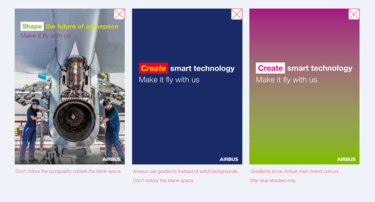
To create a strong visual link to the Airbus brand, only the main colour palette should be used if creating gradients over backgrounds.
Gradients can be vertical or horizontal - but not radial or diagonal.

Don'ts
Photographic style
To exemplify the fascinating context Airbus employees are engaged with everyday, the imagery consists of macro and micro shots.
This can include products in flight, on the ground or people in action, proving our expertise.
Find photos in the Airbus Media Gallery and Airbus Media Centre. The image look and feel must be in line with the Airbus Photo guidelines.
Please note that all images used for external communication need to get final approval by brand management before production.
Chosen imagery should offer enough free space for the headline and tagline.
Never overlay text on people's faces or the key focal point of the image.
For photo shootings please contact the Audiovisual team and add the pictures to the Airbus Media Gallery.


